It's not surprising that some partners are especially confused about marketing right now. There are marketing experts telling you to build content and make your Web site a prospect magnet. And there are marketing gurus telling you to automate your marketing to run e-mail and ad campaigns flawlessly (what a marketing word). So, which should you do?
Both. To make the most of you marketing content, you should deliver it through your Web site and through regular marketing campaigns.
While that sounds expensive and complicated, it really shouldn't be. Follow some common-sense guidelines and you can manage your own marketing campaigns just fine.
The Realities of Inbound Marketing
The idea behind inbound marketing is that by posting lots of great, keyword-rich content on your Web site, your buyers will find you through their searches. Practically speaking, most partners can't consistently create enough content to appear at the top of search results.
Which is why marketing campaigns are so important. You need to get the content that you create in front of as many eyes as possible. The more systematic and strategic you are about executing campaigns, the more successful you will be.
The Elements of Marketing-Campaign Success
As with any marketing activity, the first step is to define your target audience. A tight focus on a specific group with a specific problem will improve results. For many partners, it makes sense to run a vertical campaign to a targeted vertical audience and run a horizontal campaign to a larger audience.
With your target audience in mind, build your campaign with:
- High-Value Content: If you have the resources to create your own content, great. If you need some help, here is a list of ideas. Whitepapers, articles, infographics, e-books, seminars and webinars can all deliver the information that your prospects need to solve their problems.
- Contact Lists: Most partners have built significant lists of contacts over the years. With some cleanup and additions, those lists continue to be one of your most valuable marketing assets.
- Messaging: Through e-mail, blogs and social media, let your prospects know that you have great content to help them decide how to solve their problem. Keep it short and simple.
To be effective, the campaign needs to continue over an extended period of time. Best case, you offer new content that supports the campaign topic each month. Run the campaign for a year or more.
You don't need a big staff or expensive marketing-automation software to run marketing campaigns successfully. Those assets are certainly nice if you can afford them, but you can execute with limited resources and still be effective. Start small and build -- but most importantly, keep it going.
What resources are you using to build marketing campaigns? Add a comment below or send me a note and let's share the knowledge.
Posted by Barb Levisay on February 26, 20140 comments
A check of your Web site analytics is likely to reveal that your "About Us" page is one of the top three or four pages that your prospects visit. But even though it receives all this attention from visitors, the About Us page is usually the weakest on content -- cut-and-paste mission and vision statements, a few photos of the leadership team, and done.
The title of the About Us page may suggest that it's all about your company, but that's not really the case. The About Us page should be all about serving your visitor.
Think about a likely scenario: Visitors get to your Web site through a Web search, paid ad or an e-mail that you sent. They hit whichever page you linked to, whether a landing page or the service page that you are promoting. After they see that you deliver the services that can potentially solve their problem, they want to see if you are likable. So, they go to the About Us page.
Your visitors are looking for validation that you are the type of firm that they can trust, but also -- and perhaps more importantly -- that you would be pleasant to work with. Which is why the About Us page should really be all about how you work with customers.
Show Your Personality
Of all the pages on your Web site, the About Us page should connect with prospects on a personal level. Avoid gobbledygook -- don't try to impress with big words and technical terms. Use a conversational tone to show your personality and build rapport.
A few ideas to build a personal connection with your visitors:
- Share the human side of your history. Why was the business started and how has it grown?
- Videos with customers and employees, or, better yet, employees and customers together.
- Stories of community involvement and charity support.
Building confidence is also important. Post the awards you have won to validate your relationships with vendors and dedication to excellence. Facts and figures about your team, like certifications and years of experience, demonstrate the expertise of people prospects are likely to work with if they engage your firm.
The Perils of the Leadership Page
Partners have varying views on the importance of a leadership page. Some think that it is self-serving and avoid it, while others believe that it establishes trust by presenting the backgrounds of the people behind the promises. There is no right answer, but there is a risk. Buyers come in all sizes, shapes, colors and sexes. If the pictures on your leadership page don't represent diversity, you may be sending an unintended message.
A welcome trend in About Us sections is to display photos of everyone in the business, not just the leadership. Photos of past customer events, team-building exercises and everyday work can go a long way in showing the "real" face of your business.
The About Us page plays an important role in your Web site presence. Prospects want to know more about your organization than just what services and solutions you offer. To engage with you further than a Web site visit, they need to feel comfortable that you are the type of firm that they want to work with.
How do you engage your Web site visitors? Add a comment below or send me a note and let's share the knowledge.
Posted by Barb Levisay on February 12, 20140 comments
Are your corporate colors navy blue and gray, with maybe a little maroon thrown in to spark things up? When most partners were choosing corporate colors more than a decade ago, they wanted to evoke security and stability. Think pinstripes. Those were good decisions at the time.
Now, it's time to update. An ever-increasing number of your buyers are digital natives. Security and stability are still important to them, but when they hit your blue-and-gray Web site, they see stodgy, out-of-date.
Our visual experience would be pretty boring if styles and designs stayed the same all the time. Microsoft has led the current design revolution in flat design and bold color choices. Coming from a company whose current image is not exactly innovative, it's been an impressive transformation.
Following Microsoft's example, 2014 is a great year for all partners to re-evaluate their color choices and update their Web sites. Color choices are especially important for those partners who are following Microsoft's lead -- bold colors are what makes flat design work. A good example is Microsoft's by the numbers Web site.
The Brand Is Not Sacred
Some marketers are shaking their heads: "We can't change the brand." Not to put too fine a point on it, but, "Baloney."
Unless you are in the same league as Coke or Microsoft, your brand is probably not recognized and certainly not remembered. Think about your primary interactions with your customers and prospects -- they're probably almost exclusively through e-mail. They don't see your logo until they have read through the e-mail and looked at the signature line.
When your customers access the customer portal, or prospects visit the Web site for content, do they smile? Is it bright and cheerful or dark and sterile? It's likely that a little yellow or purple could really liven things up.
Inspiration
To give you some inspiration, check out Adobe's "Kuler" color scheme designer. Fair warning: It's addictive even for non-marketers.
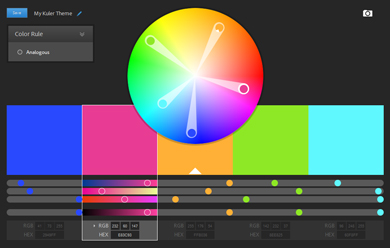 Adobe's Kuler color wheel.
Fortunately, there are some great examples from partners, as well. Hats off to these partners who have taken those first, bold steps away from midnight blue. Seriously, check out these examples to see that your business can still look professional and trustworthy when you use bold colors:
Just Like Technology, Color Trends Change
Design is transient. Don't get too caught up in the fear that you won't like the colors in a couple of years. You should update your Web site every two years to stay current with design trends. The good news is that those updates are getting easier with every passing year.
Have some fun -- spin the Adobe Kuler wheel and pick a set of bold colors. You'll make an impression on customers and prospects more quickly when you add a little color to their lives.
Are you using bold design to differentiate yourself? Add a comment below or send me a note and let's share the knowledge.
Posted by Barb Levisay on January 30, 20140 comments
If you are marketing Office 365 and not using the features to simplify and improve your own marketing efforts, we have some recommendations from a true evangelist.
As the marketing manager for Pittsburgh-based MSP/Dynamics partner Vertical Solutions, Tina Featheringham makes full use of the Office 365 features to connect with prospects. She shared her most valuable tip for each Office application to get you started.
Word for Formatted Blog Posts
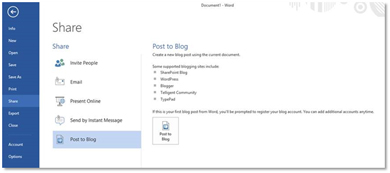
Create a blog post in Word and automatically post it to your blog. This is especially helpful when you have a post with complicated formatting -- for example, this one.
Most content management systems (CMS), including SharePoint and WordPress, are supported, allowing you to simply save your Word document directly to the blog. In Vertical Solutions' case, the company's current CMS is not supported, but Featheringham has a workaround. By posting to SharePoint, she creates the HTML code needed for her CMS, then copies and pastes the code.
 [Click on image for larger view.]
Create your entry in Word and post directly to your blog.
[Click on image for larger view.]
Create your entry in Word and post directly to your blog.
Surveys in Excel
As a best practice, Featheringham regularly uses surveys to engage with her prospects before and after events. She asks very specific questions, like "Were you able to install the payroll update?" before a year-end close webinar, and "Would you prefer a turkey or ham sandwich?" the day before a lunch seminar. The engagement earns close to 100 percent of registrants attending Vertical Solutions events.
"When you get buy-in beforehand, you've established a connection," Featheringham noted. "Before our next Office365 webinar, I will be asking prospects if they have a plan to address the potential vulnerability of their XP machines."
While there are lots of survey options available to marketers, the functionality of Excel surveys through SkyDrive make it much easier. To see how easy it is, log in to your SkyDrive account and click "Create," then choose the option "Excel Survey." The survey function collects all the data, making it easy to monitor and report.
Interactive PowerPoint Presentations on Your Web Site
Embed interactive PowerPoint presentations in your Web site in just a few clicks. Using Office 365, or Office 2013 and SkyDrive, you can embed a presentation on your blog or Web site to play with audio, video, transitions -- the whole works. Instructions are here.
Having presentations available on SkyDrive ensures the sales team has the most current PowerPoint and that it's easy to share, whether on the phone or in the field. No attachments to e-mail, just a link to the presentation.
Featheringham also uses SlideShare to take advantage of SEO benefits, but embedding PowerPoints in blog posts has other benefits. "We are working to make our blog more personable," she said. "A presentation can educate, but also allows you to show some personality. Office 365 just makes it easy."
Outlook Integration with LinkedIn
The Outlook Social Connector gives you an automatic connection to LinkedIn profiles through Outlook 2013 or Office 365. Particularly valuable to the Vertical Solutions sales team, photos and recent activity of prospects are displayed for background when they make a call. Basic information displays even if you are not connected to the person on LinkedIn.
Marketers as Evangelists and Trainers
Featheringham's Office expertise is not confined to marketing. During Vertical Solutions' weekly sales meetings, she shares tips to help the sales team take full advantage of Office social and productivity functions. While upgrades are performed for customers, Featheringham trains users on the new interface and features to promote adoption.
"We have a lot of customers who are not technically savvy," Featheringham said. "It helps to provide the user perspective while you walk them through the ribbon concept. I also show them specific ways that Office 365 can save time during the day. The little things that save incremental amounts of time add up, and suddenly you have an extra hour every day."
Give Featheringham's tips a try. Marketing a product is easier when you use it every day and realize the value that it delivers. While there are plenty of marketing tools to choose from, don't overlook Office 365. You may even become the top evangelist in your company.
How do you evangelize the solutions you sell? Add a comment below or send me an e-mail and let's share the knowledge.
Posted by Barb Levisay on January 16, 20140 comments
Do you feel like you made progress in your marketing efforts in 2013? For the most part, channel partners have made the adjustment to the new worlds of content and inbound marketing. Web sites are getting refreshed with content focused on education instead of product descriptions.
This is great progress, but there are still plenty of challenges that partners have to overcome to keep marketing going. Customers and service delivery are your primary concerns, as they should be, but keeping the pipeline full is a constant worry.
As you plan your marketing for 2014, take proactive steps to overcome the most common challenges, including:
- Making Time: This is definitely the No. 1 marketing killer for most partners. The only way to address this one is to hire someone, either an employee or an outside contractor, whose job is to keep marketing going. In your evaluation, look for a person or firm who can prove they will consistently create great content.
- Budget: You do have a budget for marketing, don't you? If not, the obvious first step is to establish one. Whether it's $500 or $10,000 a month, marketing should be a planned part of your activities and expenditures. When marketing is not planned, you are likely to bounce from one tactic to another. One-offs rarely work, no matter what the marketing vendor says.
- Lack of Industry Focus: Defining your prospect base as "anyone with money" does not count as market focus. Yes, you don't want to walk away from any business, but that doesn't mean that you should spend marketing dollars that way. Your investment in marketing, both time and money, will be more effective if you focus on a specific industry.
- Using Too Many Tactics: Your marketing will also be more effective if you focus your efforts on one or two tactics. For example, start with a monthly e-mail newsletter to your current prospect list. Once you are getting the newsletter out every month without fail, you can add quarterly seminars. It's far better to do one thing consistently than a bunch of them occasionally.
- Keeping It Going: See above. The secret to marketing that works is consistency. Whatever tactics you choose, do them often and do them without end.
The year ahead looks promising for our industry. This is a great opportunity to get your marketing structure in place and humming along. You will build business in the near-term and be in a far better position to weather the next downturn.
What creative marketing are you planning for 2014? Add a comment below or send me a note and let's share the knowledge.
Posted by Barb Levisay on December 18, 20130 comments
Every marketer today is faced with the challenge of creating good content day in and day out. Coming up with new ideas and interesting ways to present information can feel pretty overwhelming on some of those days. That's when it's time to start mining Microsoft's Ready-to-Go (RtG) marketing site.
Through steady improvement over the past several years, RtG has become a marketing content goldmine for partners. Some of the nuggets take a little more digging than others, but we've collected a few worth sharing:
- Notes in campaign PowerPoints. In most of the campaign sales presentation decks, there are speakers' notes in the first few slides. The notes are written in a more conversational tone than much of the Microsoft marketing materials, which makes them work well as a base for blog posts.
- Whitepaper out-takes. While the whitepapers in campaigns make perfectly fine calls to action in themselves, there is no reason you can't get a little more goodness from them. With a little reworking, you can turn each of the key points in the whitepaper into a blog post or article.
- Telesales guides. In many of the campaign Partner Readiness tools, there are telesales scripts to help train your sales team on key talking points. Each one of these gems can provide content for blog posts and articles, or even provide the basis for updating Web content. Common questions, role-based problem identification and product comparisons provide a ton of great content that is solution-focused, not product-focused.
- PowerPoint to ebook. eBooks are a great call to action for your Web site or campaign, and many of the sales decks on RtG can be easily transformed. Keep each eBook to one topic using the slide graphics and add explanatory text. Add your own value proposition and branding to personalize the document.
Additional Microsoft Resources
While RtG holds the motherload of Microsoft partner content resources, there are more resources worth mentioning to enrich your inbound marketing:
- Microsoft News Center. There are lots of resources that you might not think to look for on Microsoft's press site. Infographics, press releases and research reports can all provide topics for blog posts. Video clips can help you add a bit of professional footage to your next YouTube creation.
- Drumbeat for Office365. Drumbeat is a new site that centralizes sales resources for Office 365. The resource page is a bit limited now, but worth the visit.
- Microsoft customer-facing sites. For everything from Dynamics to Azure, there are customer-facing Web sites that can provide ideas to help you build content. As much as anything, these sites can help you stay on top of layout and design trends to keep your marketing materials looking modern.
Make It Your Own
As you tap these resources, use them as a base to build your personalized content. Your prospects need to see your personality shine through and understand the unique value that you add to the solution sets. Every piece of marketing content that you produce should help prospects understand how they can solve their business problems -- and how you can assist.
Microsoft's investment in marketing tools for partners has increased dramatically over the past several years. Take advantage of the opportunity to increase the quality of your content by building on Microsoft's work. That's what it is there for.
How are you using Microsoft resources to build great content? Add a comment below or send me a note and let's share the knowledge.
Posted by Barb Levisay on December 05, 20130 comments
When Microsoft launches new services and devices, partners get the opportunity to build on the national marketing push and increased public awareness.
Yes, Microsoft used to involve partners more, hosting big launch events across the country. Now, partners have two choices: Wish for the past to return or take matters into their own hands. Cyber Advisors, a managed infrastructure partner based in Minneapolis, Minn., chooses the later, with great success.
Bridging the Gap for SMB
In October, building on the releases of Surface 2 and Windows 8.1, Cyber Advisors held an event titled "Out with the Old, IN with the New" at the Microsoft Store in the Mall of America.
"It was the second year of our Microsoft Store Series events," said Dan Sanderson, VP of sales and marketing for Cyber Advisors. "We time the events close to Microsoft launches because it drives interest. Last year, we capitalized on the Surface release."
Consumerization of IT is one of the forces that Sanderson sees as driving interest for businesses to attend Cyber Advisors' events. "Especially in the SMB space, we are seeing a crossover between the consumer side and the business of Microsoft," Sanderson said. "The owners of these businesses have a phone and tablet that they use for both their personal and business life. By inviting business customers to the Microsoft Store, we can show them how to bridge that gap."
Of the nearly 100 attendees at the October event, SMB business owners and managers made up about three-fourths of the crowd, with enterprise managers filling out the group. Reflective of the experience of other partners, events at Microsoft stores are most effective in drawing small and midmarket businesses.
'A Consultative Approach'
The Cyber Advisors seminar started with a short presentation explaining the benefits of moving off Windows XP. In all of his company's events, Sanderson keeps the sales part short, spending the bulk of the time letting technical people demonstrate.
"The last thing that customers want is to listen to salespeople," Sanderson said. "We take a consultative approach, bringing credible technical people in to present. Our top level architects do the demonstrations."
After the introduction, two sessions were set up on opposite sides of the store. On one side, consultants presented a scenario-based demonstration based on the Microsoft Experience Center (MEC) program. On the other side was a demonstration of Office 365 and the ease of migrating from Exchange. Attendees could move from one side to the other to get a sense of both presentations.
Results
"We got a lot of opportunities coming out of the event," Sanderson said. "There are three specific opportunities that will pay for the event 25 times over, one being a 300-seat Exchange-to-Office-365 migration."
While social media marketing may get all the attention these days, events are an effective way to connect with your prospects, especially in the SMB space. If you need more inspiration, check out the Microsoft Ready-to-Go site for more partner event stories.
How are you using events to connect with prospects? Add a comment below, or send me an e-mail and let's share the knowledge.
Posted by Barb Levisay on November 14, 20130 comments
Committing to a social media marketing strategy is a tough pledge for most partners to make. Paybacks aren't immediate and the time investment can be substantial. Yet as young people begin to move up through the ranks of business to become the buyers you serve, is there a choice?
It Takes One To Know One
After feeling that the money spent on outsourced social media marketing was not delivering adequate returns, Ric Opal, vice president of Peters & Associates, a Chicago-based multi-competency partner, decided to hire a young person to manage the company's social media.
"We created a new position and hired a recent college grad. He manages social and has additional digital marketing responsibilities," Opal said. "We've sent him to social media boot camp to learn from others immersed in the tactics. Whoever manages your social media needs to be connected to the social marketing community."
The approach is apparently working. Peters & Associates earned the 2013 Microsoft Midwest Area Partner and Central Region Partner awards at the Worldwide Partner Conference in July.
"We use social to cultivate our brand and as a lever to drive SEO," Opal said. "People who are interested are eventually going to go to your Web site to figure out exactly what you do. Having a clear message of how you add value to the technology on your home page is critical."
To simplify the mechanics of social media management, Peters & Associates uses Hootsuite to send out Tweets and monitor for social traction. Tweets are sent out on a regular schedule, driving to the company blog and to Microsoft content. Compensation motivates Peters & Associates' field professionals to write regular posts keeping the company blog content relevant. A Web site refresh is in the works that will better capitalize on their social and blogging activity.
A Fundamental Shift for Every Business
The need to make social media a part of doing business is shared by partners and customers alike. Every business has to adjust to the fundamental shift in how we interact with employees, customers, vendors and prospects. By using and becoming familiar with the tools and the challenges themselves, partners are in a better position to fully understand and assist customers.
"We need to be able to speak in the marketing vernacular to our customers. To help them drive sales and connect with their customers in different ways -- and on different devices," Opal noted. "Partners can't afford to be socially illiterate. You have to speak the customer's language."
To that end, Peters & Associates is using Yammer internally to gain an understanding of how its customers may use it. Gaining familiarity first hand with all of the evolving tools in the Microsoft stack has always been a best practice of courageous partners.
The Changing Landscape
As the digital natives work their way through college and into the business world, they change the ground rules for customer engagement. Partners can choose to ignore or adapt to the changing landscape -- the former at their peril.
"If you are not out making noise and someone else is, buyers will be led to someone...and it's not going to be you," Opal said. "Much like having a Web site is a basic requirement, social is a required component for every partner. It's just a reality."
How are you using social media to promote your business? Add a comment below or send me a note and let's share the knowledge.
Posted by Barb Levisay on October 31, 20130 comments
Recruitment is often cited as the No. 1 challenge for partners. Is your Web site helping?
As a quick exercise, pretend you are a student graduating this spring with a degree in business information technology. (Even better if you can imagine that you are something other than a white male student.) Now, go to your company Web site.
- On the home page, are there any words or photos that appeal to a young person looking to make an impact on the world?
- Is it easy to find the careers page, or does it feel like an afterthought?
- Look at the leadership page. Do the photos reflect diversity and the opportunity for advancement, regardless of gender or ethnicity?
- Are there any pictures of real people on the site (other than management), or just stock photos of corporate-looking models?
- Are there any stories about the projects that you work on, or the people who work for you?
How did you do? Is your Web site a talent magnet or is it time to put a Web site refresh at the top of the to-do list?
Inspiration
There is no one "right way" to make your Web site attractive to the young and talented. The good news is that there are partners doing it right and lessons to be learned. Here a just a few examples:
- The personalities of the employees featured on the home page of Centare shine through to speak volumes about the culture of the company.
- It looks like the "interknowlogists" at interknowlogy have a lot of fun. Who wouldn't want to work with that group?
- Reading the profiles of Slalom Consulting employees is like eating Doritos -- just one more before I get back to work. They also share heartwarming stories of the employee sabbaticals.
- Perficient features employee blog posts on its home page and lets employees tell the story themselves. The diversity of the storytellers must attract not only young but "seasoned" professionals thinking about a job change.
The even better news is that the same elements that attract new employees will also appeal to potential customers. People want to do business with people they like. Letting prospects get to know the people who would work on their project builds trust and confidence.
Time for a Refresh
Refreshing your Web site is a daunting task. It's easy to keep moving it to the bottom of the marketing to-do list. If recruitment is a priority, now you have another reason to move it to the top. And, a bit of inspiration.
How are you attracting talent? Add a comment below or send me a note and let's share the knowledge.
Posted by Barb Levisay on October 16, 20130 comments
Hot on the heels of the infographic explosion comes the eBook -- the latest incarnation of marketing content delivery. While our industry has a long history of using whitepapers for lead generation, the eBook is gaining traction with partner marketers. So, what's the difference and does it matter?
As with most things marketing, whether it matters lies in the perception of the target audience. Whitepapers have long been regarded as in-depth explorations of subjects written by experts. A decade ago, Microsoft would release 64-page technical whitepapers written for IT managers who were assigned the acronym TDM, which stood for technical decision maker. As non-technical line-of-business managers became more involved in technology decisions, whitepapers got less technical, targeting BDMs, or business decision makers.
Deciding whether to call your document a whitepaper or an eBook should be based on your clearly defined target. Don't try to write a piece that will appeal to both TDMs and BDMs -- the two groups have different goals driving their decisions.
If TDMs remain your primary target, they still need to understand the technology at a deeper level. The classic whitepaper written by an expert still plays an important role in the industry.
The BDM obviously has a different perspective. Start talking about ASP.NET Web APIs or Hyper-V Replication and a non-techie will instantly hit delete. The BDM who downloads a technology-focused whitepaper is probably trying to solve a business-process problem that the IT team isn't helping him fix. Or he's trying to understand what IT is telling him.
White papers written for BDMs historically have taken a standard approach, following a progression such as:
- Define the market drivers.
- Describe the challenges to fulfilling the market drivers.
- Define the ideal solution.
- Explain why your product fits the bill.
The intent is to provide the BDM with evidence that the solution is proven to be effective. Of course, whitepapers are often no more than an extended brochure, but the goal is to provide the BDM reader with "objective" data points.
The eBook has added a new dimension to the mix through design. BDMs, like everyone else, want their information in bite-size chunks with lots of subheads and call-outs. The title eBook promises eye candy -- something easy to consume.
There are a couple of important differences in the layout and design of whitepapers versus eBooks. Most whitepapers are portrait-oriented Word documents saved as PDF-formatted files. They usually contain hyperlinks, but that's the limit of their interactivity.
EBooks, on the other hand, tap into the latest functionality of interactive and multi-device publishing capabilities. Adobe InDesign, a common application used to create eBooks, allows publishers to embed pop-up windows, creative page navigation, slideshows and videos. EBooks come in every size, but most often opt for the landscape orientation for easier reading on a desktop or tablet screen and they're often offered in both PDF and EPUB formats.
While all these bells and whistles make an eBook sound appealing, there's no reason whitepapers can't be oriented horizontally or include interactive elements.
Another difference, driven only by common practice, is that most whitepapers require the prospective reader to fill out a form in order to download and gain access to the whitepaper itself. That "lead" will likely get a phone call from the partner to move the prospect along. Trying to capitalize on the social element and a higher volume of downloads, eBooks usually don't require a form. There's a lot of disagreement on whether to gate (require a form to download) any marketing materials. There's no argument that an un-gated offer will get far more downloads than a gated one.
The difference between whitepapers and eBooks definitely isn't clear-cut, but it's also not worth arguing over. As with most things marketing, there's lots of room for creativity. Electronic publishing tools make it easy to create engaging and informative marketing documents -- no matter what you call them -- that will win you customers.
Posted by Barb Levisay on October 01, 20130 comments